FOR HOUSES OF WORSHIP

Camera control for modern worship teams.

Give your team professional camera control without the complexity. Control every camera, troubleshoot issues, and support your team from any browser — on site or fully remote.

A practical fit for church production Read the story

UNIVERSAL COMPATIBILITY

Works with any PTZ camera.

Compatible with 400+ models of cameras

AIDA Imaging12 modelsAVer9 modelsBirdDog18 modelsBolin11 modelsBZBGEAR14 modelsCanon26 modelsJVC14 modelsLumens22 modelsMarshall17 modelsNewTek8 modelsOBSBOT10 modelsPanasonic42 modelsPTZOptics31 modelsSony38 modelsTelycam13 modelsVaddio16 modelsZ CAM7 models AIDA Imaging12 modelsAVer9 modelsBirdDog18 modelsBolin11 modelsBZBGEAR14 modelsCanon26 modelsJVC14 modelsLumens22 modelsMarshall17 modelsNewTek8 modelsOBSBOT10 modelsPanasonic42 modelsPTZOptics31 modelsSony38 modelsTelycam13 modelsVaddio16 modelsZ CAM7 models

VOLUNTEER TOOLKIT

Make every volunteer feel like a pro in minutes.
Movement tools

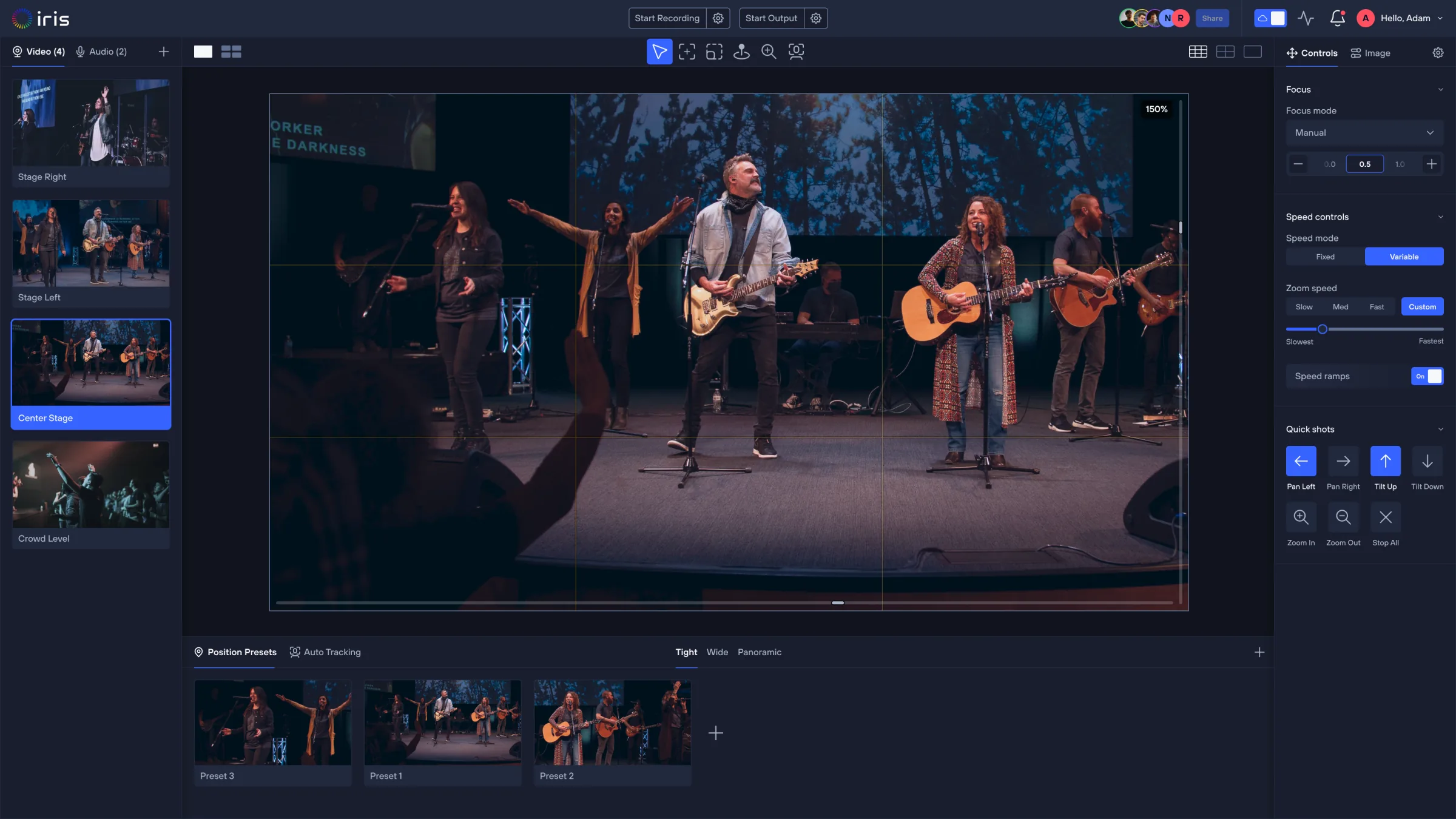
Click anywhere to center your shot, or pan, tilt, and zoom with intuitive controls. No joystick experience required.

Framing tools

Define your shot and Iris automatically frames the camera — making professional composition fast and easy.

Presets

Save both position and image presets — pulpit, worship team, wide, baptism and altar-call shots, plus the exposure and color settings that go with them. Any operator reproduces the service's best looks by pressing a labelled key.

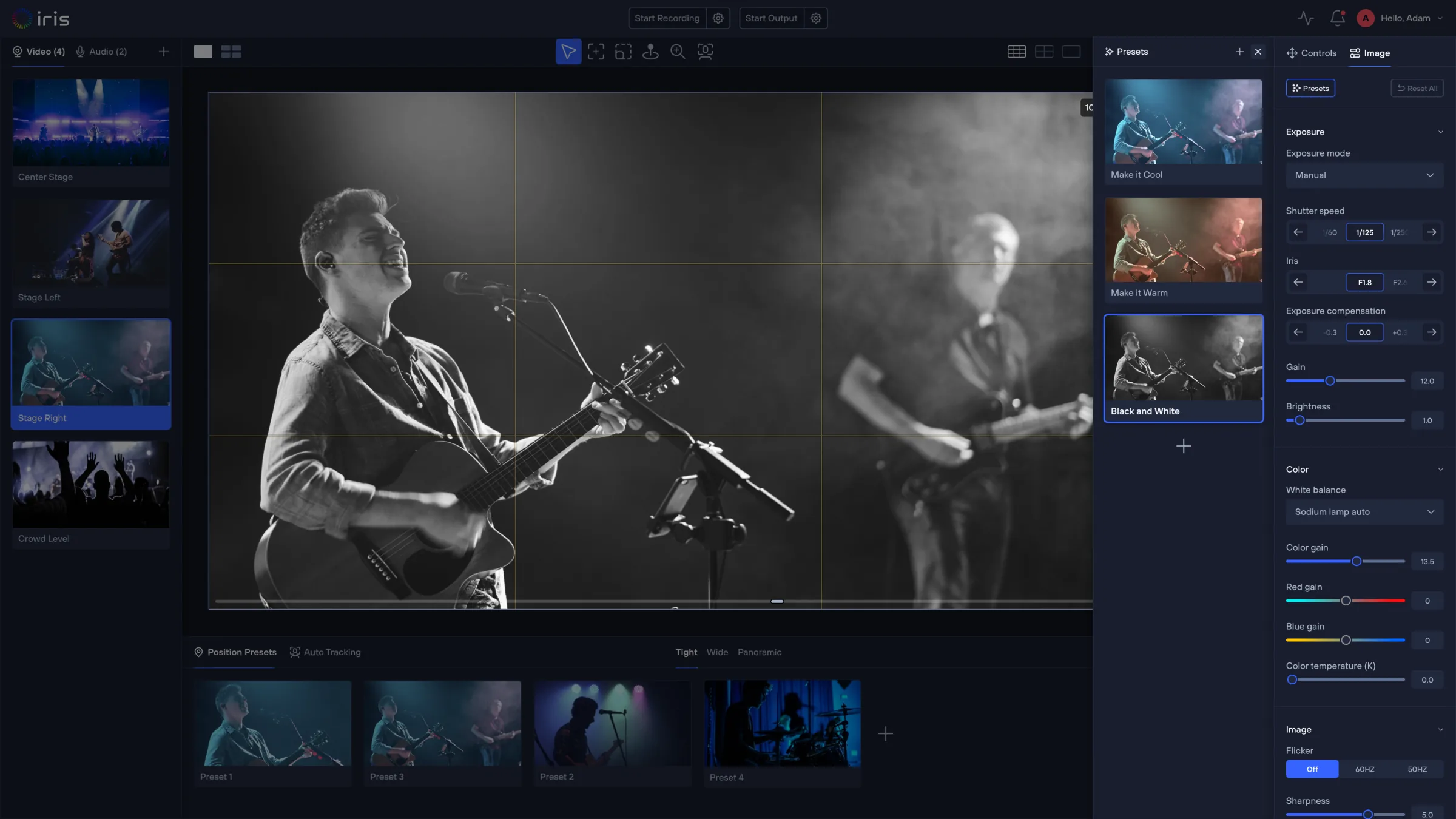
Iris image presets — Make it Cool, Make it Warm and Black and White applied live, with exposure, color and image controls

Color grading

Exposure, white balance and color — adjusted in real-time and saved per service, room and light. The mismatched camera stops being the one everyone notices.

PRE-SERVICE CHECKS

Know every camera is ready before service starts.
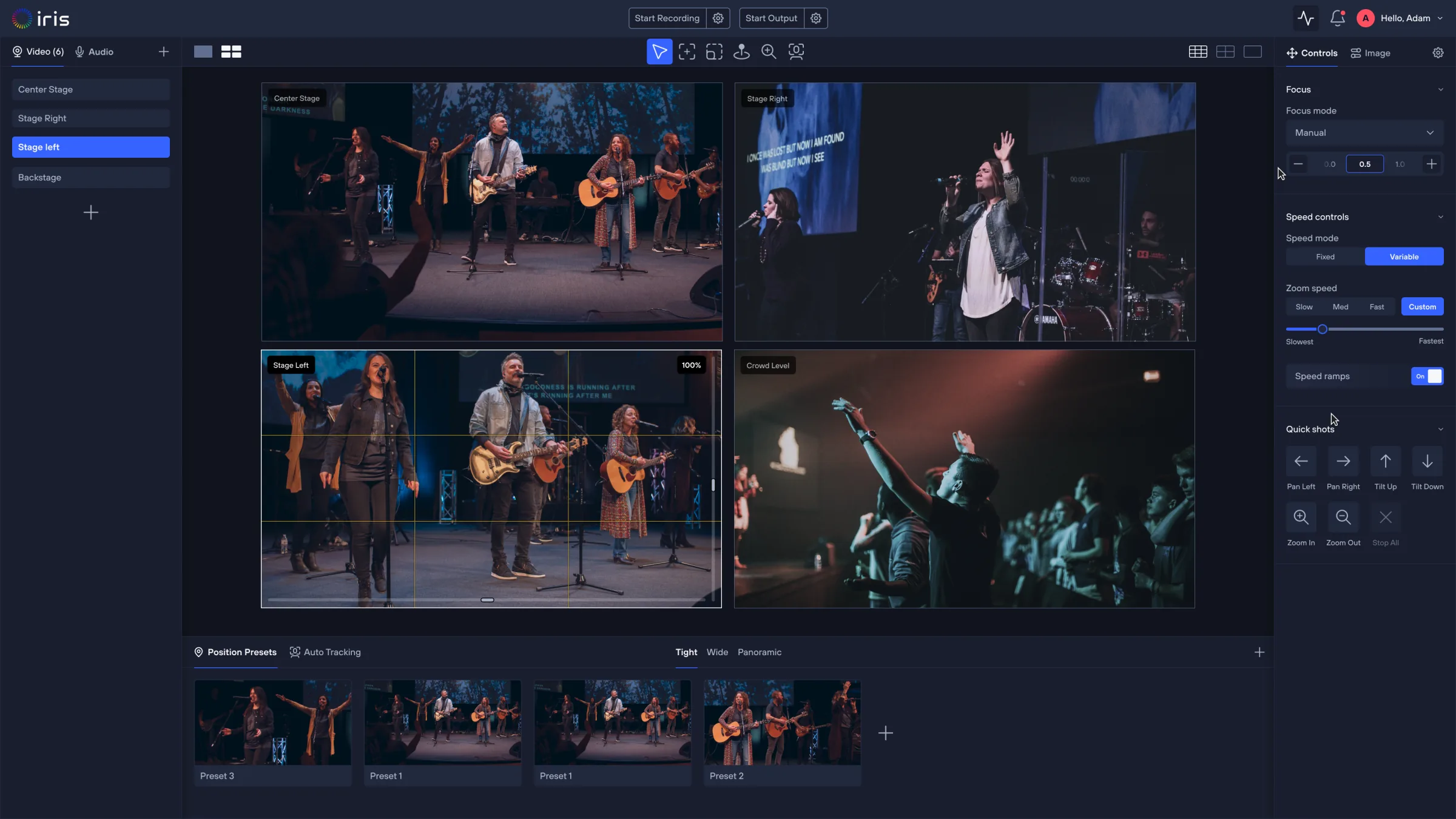
Go live knowing every camera is readyMonitor every feed, preset, and image setting before the show starts — so you can catch problems before your audience ever sees them.
Spot issues before they become problemsSee source quality, resolution, bitrate, and FPS at a glance, with instant warnings when a feed drops or degrades.
Iris Studio multi-view of a sanctuary — four camera angles with focus, speed and quick-shot controls, plus position presets
Iris Studio with collaborators in session — shared avatars and Share control in the topbar above a live sanctuary camera

REMOTE SUPPORT

Support your team from anywhere.

Access anytime, anywhereControl every camera from any browser. Produce remotely or jump in to troubleshoot.
Collaborate with your teamProduce together in real time, or grant remote access for a few hours or 24/7.

WORKFLOW

Compatible with all your existing tools and workflows.

Connect your cameras, controllers, and production tools to Iris without rebuilding your workflow.

INPUTS

Connect your cameras and controllers

Bring your existing cameras, controllers, and video sources with you. Iris fits into the setup you already have.

Control inputs
Mouse
2
Keyboard
Stream Deck
Game Controller
IP Joystick
Cameras
PanasonicCanonSonyBirdDog+25 more
Video sources
Encoders / captureNDIRTSPHDMI

OUTPUTS

Connect your production workflow

Send video to the graphics, switching, recording, and streaming tools you already use.

Output protocols
NDISRTRTMPRecord
Graphics
ProPresenterResi
Switchers
OBSvMixExisting switchers

HARDWARE COMPANION

Connect your favorite controller.

Use Iris with your favorite hardware controller. Just plug in and Iris works alongside it as a powerful software companion.

Mouse
2
Keyboard
Stream Deck
Game Controller
IP Joystick

DEPLOYMENT

Control your cameras from anywhere.

Run Iris locally, remotely through the cloud, or combine both. Choose the workflow that fits your production.

Production location
OperatorOn site
Iris cloud
Local network
Cam 1
Cam 2
Cam 3
Local operator

BUILT FOR WORSHIP TEAMS

Make every service easier to run.

Easy for volunteers

Simple controls and presets help anyone get up to speed quickly.

Consistent every week

Save shots and settings so every service starts ready.

Help from anywhere

Bring in an experienced operator whenever your team needs support.

Keep your workflow

Use Iris with the cameras and production tools you already have.

CUSTOMERS

Trusted by worship teams.

See how churches are using Iris to simplify camera operation, improve production quality, and support volunteer teams.

Iris made it easier for new volunteers to run camera without weeks of training. Our Sunday workflow is simpler, more consistent, and easier to support.

Sarah M.Production Director
18 PTZ · 4 campuses

Before Iris, we spent Sunday mornings troubleshooting camera issues. Now we check feeds, presets, and camera status ahead of time — the team has much more confidence before going live.

Michael C.Media Director
4 PTZ · 1 campus

Iris helped us standardize camera operation. Our teams now use the same presets and workflows, which has made production far more consistent.

David R.Technical Arts Pastor
9 PTZ · 3 campuses

Questions worship teams ask before trying Iris.

Does Iris work with the cameras we already own?
Yes. Iris supports mixed PTZ camera fleets across major brands and models — 400+ supported cameras across the protocols above.
Can volunteers use Iris without broadcast experience?
Yes. Iris is designed around simple controls, named presets, click-to-frame and automation — most volunteers are comfortable within their first service.
Does Iris work with physical controllers?
Yes. Iris supports controller-based workflows — joysticks, gamepads and Stream Decks — for teams that want tactile camera control.
Does Iris replace our switcher, OBS, vMix, ProPresenter, or Resi?
No. Iris fits into your existing AV workflow as the camera-control layer. Your switching, streaming and presentation tools stay exactly where they are.
Can we access camera feeds remotely?
Yes. Authorized users can monitor feeds, adjust shots and support volunteers from any browser, anywhere.
Can Iris help us troubleshoot before service?
Yes. Teams can check camera status, feeds, framing, presets and image settings before going live — and fix issues remotely.

Ready to simplify your production?

Make camera operation easier for volunteers, improve production quality, and troubleshoot before service — without replacing the AV workflow you already use.